A home security camera is only as useful as the view it captures. A poorly placed camera can miss faces, record the wrong area, trigger constant false alerts, annoy neighbours, waste power, and still fail when something actually happens.
That does not mean every home needs more cameras. In many cases, the more responsible choice is to place fewer cameras better: focused on genuine access points, angled away from private spaces, supported by sensible lighting, and maintained well enough to keep working after the first week of enthusiasm fades.
Responsible outdoor security camera placement is not just about catching more footage. It is about recording the right footage, using light carefully, respecting nearby homes, and avoiding unnecessary electronic upgrades when a simple adjustment would solve the problem. It also fits into a wider conversation about home sustainability and tech security: useful devices can still create privacy, energy, waste, and maintenance problems if they are installed thoughtlessly.
Key Takeaways
- Start with access points. Doors, driveways, side paths, garages, gates, and main approach routes matter more than wide, unfocused coverage.
- Place cameras for identification, not just motion. A camera that sees movement but never captures faces may not be doing the job you expect.
- Night footage depends on lighting and angle. Glare, reflections, porch lights, and infrared bounce can make high-resolution footage nearly useless.
- Privacy is part of good placement. Avoid filming neighbours’ windows, private yards, or areas you do not need to monitor.
- Do not upgrade too quickly. Before buying another camera, test the existing camera’s height, angle, Wi-Fi signal, storage, lighting, and privacy zones.
In Focus: Responsible Camera Placement
- 62 million tonnes: The estimated amount of e-waste generated globally in 2022, according to the World Health Organization.
- 22.3%: The share of global e-waste documented as formally collected and recycled in 2022, according to the same WHO summary.
- Property boundaries matter: Victoria Police advises households to ensure CCTV cameras only cover their own property and to avoid angles that capture neighbours’ property.
- Outdoor lights should not run blindly: YourHome recommends timers, daylight controls, and motion sensors for outdoor security lights.
- Glare is a design problem: The U.S. Department of Energy notes that outdoor glare becomes a problem when bright light is introduced into a dark environment, especially with small, intense LED sources.
Start With What You Actually Need to See
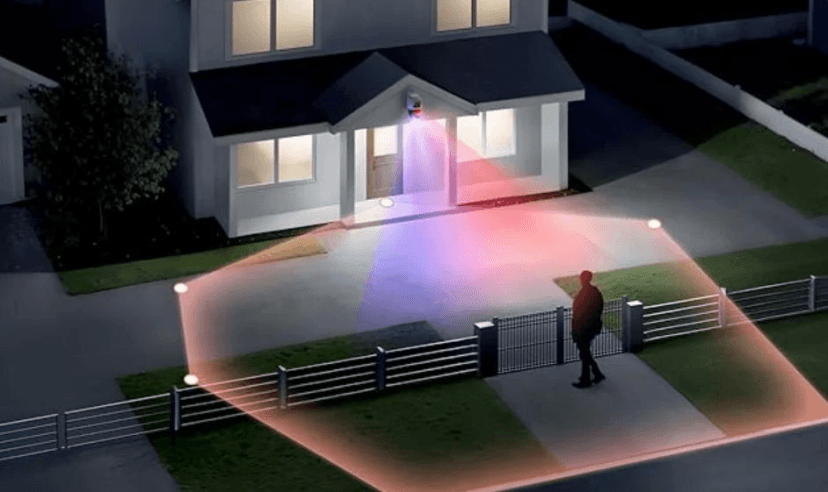
The first mistake is treating outdoor camera placement like a game of maximum coverage. It is tempting to aim one camera at the widest possible area: the front yard, footpath, street, driveway, porch, and side gate all at once. The result may look impressive in the app, but wide coverage often means weak detail.
A responsible setup starts with a simpler question: what event would you actually need to understand later?
For most homes, the answer is not “everything.” It is usually one of these:
- someone approaching the front door;
- a vehicle entering or leaving the driveway;
- a side gate being opened;
- someone entering a garage, shed, or rear access path;
- a delivery being left, moved, or taken.
That is why placement should come before shopping. Before buying another security camera, walk around the property and list the specific views that matter. If an existing camera can be moved, lowered, turned, or supported with better lighting, that may solve the problem without adding another device.
Place Cameras for Faces, Not Just Movement
A camera that captures motion is not necessarily capturing useful evidence. Many poor placements still record that “something happened,” but not who was there, where they came from, or what they did.
For doors and porches, the goal is usually facial detail at a realistic distance. Mounting too high can create a top-down view that records hats, hoods, hair, and shoulders instead of faces. Mounting too low can make the camera easier to block, bump, or tamper with.
As a practical starting point, many outdoor cameras work best around 8–10 feet above ground level. That is high enough to reduce casual interference, but low enough that a visitor’s face may still be visible. The exact height depends on the lens, field of view, distance to the subject, and whether the camera is covering a close doorway or a wider approach path.
Angle matters just as much as height. A porch camera aimed sharply downward may cover the doormat beautifully while missing the person standing on it. A camera aimed too flat may capture the street, passing headlights, or bright background light instead of the visitor. For many front-door and porch placements, aiming the camera roughly 15°–30° downward is a sensible starting point, then adjusting after a real night test.
Do not judge the view from the mounting ladder alone. Stand where a visitor, delivery driver, or intruder would actually stand. Check whether the face is visible, whether the person is too close to the edge of the frame, and whether a porch post, railing, plant, wall, or light fitting is stealing the camera’s attention.
Do Not Let Corners Create Blind Spots
Corners are appealing because one camera can appear to cover two directions. Used well, they can be efficient. Used badly, they can create reflections, blind spots, and distorted views.
The common mistake is mounting a camera too tightly into the corner, then aiming it along a wall. At night, that nearby wall can reflect visible light or infrared back into the lens. The camera may brighten the wall, darken the person, and produce footage that looks technically clear but practically useless.
If a corner is the best location, give the camera some breathing room. Aim it outward toward the approach path rather than straight along a wall. Watch for rooflines, downpipes, railings, shiny door hardware, white walls, and reflective house numbers. These may look harmless during the day, but at night they can dominate the exposure.
Overlap can also help. Two cameras do not need to duplicate the same view, but partial overlap around a key access point can reduce blind spots. One camera might provide wider context, while another captures the close identification point. The responsible version of overlap is targeted and limited, not a blanket attempt to record every angle of the street.
Use Night Lighting Carefully
More light is not always better. Bright outdoor lighting can help a camera, but it can also create glare, harsh contrast, washed-out faces, irritated neighbours, and unnecessary energy use.
The U.S. Department of Energy’s guidance on outdoor lighting glare makes a simple point that applies well to home security: glare becomes a problem when a bright source is introduced into a dark environment. A camera does not need the whole yard lit like a car park. It needs enough controlled light in the right place for the subject to be visible.
This is also where energy-efficient outdoor lighting becomes part of responsible security. Motion-activated lighting, careful aiming, and lower-waste lighting choices can support safety without blasting unnecessary light across the whole property all night.
For camera placement, check these night-lighting problems before assuming the device is faulty:
- Backlighting: a bright porch light or streetlight behind the subject can turn faces into silhouettes.
- Direct glare: a light shining into the lens can wash out the frame.
- Infrared reflection: nearby walls, glass, metal, or glossy surfaces can bounce IR light back into the camera.
- Headlights: cameras aimed too directly at the street or driveway entrance may struggle whenever a car passes.
- Overexposed foregrounds: a bright railing, wall, or post close to the camera can make the person behind it look darker.
The fix is often physical, not digital. Move the camera slightly away from the reflective surface. Change the angle. Shield or redirect the light. Use warmer, lower, motion-triggered lighting where possible. Then test the view at night, not just in daylight.
Avoid Filming What You Do Not Need
Good placement includes restraint. A camera should not casually capture a neighbour’s bedroom window, private backyard, balcony, or everyday movements just because the lens can see that far.
The Office of the Australian Information Commissioner notes that residential security camera disputes often begin with a neighbour’s concern that a camera is pointed at their house. It suggests talking to the neighbour first, and then seeking mediation or local help if the issue cannot be resolved. The legal details vary by location, but the practical lesson is simple: careless camera placement can create conflict even when the original goal was home safety.
Most modern camera systems include privacy zones or masking features. Use them. If the camera needs to cover a driveway but also sees part of a neighbour’s window, block that window from recording. If it needs to cover the front path but not the entire footpath, narrow the detection zone. Responsible placement means capturing enough to protect your home, not everything the lens can technically reach.
Think About Storage, Power, and Reliability
A perfect view is not useful if the camera drops offline, runs out of battery, misses recordings, or overwrites footage too quickly.
Before drilling holes, test the Wi-Fi signal at the exact mounting spot. Exterior walls, metal cladding, garages, distance, and competing devices can all weaken the connection. If the camera regularly drops out, the placement is not reliable, even if the angle looks good.
Power is another practical constraint. Battery cameras are flexible, but they require maintenance. Solar-assisted cameras need real sun exposure, not just the idea of sun exposure. Wired cameras reduce battery anxiety but limit where they can be placed unless the home already has suitable wiring.
Storage deserves attention too. If footage is overwritten too quickly, inaccessible when needed, or stored on an insecure device, the system may fail at the exact moment it is needed. For home users, that means understanding whether recordings are stored locally, in the cloud, on a base station, or on a memory card, and how long important footage remains available.
Reliability is part of responsible placement because a camera that is constantly offline may encourage the owner to buy more gear instead of fixing the weak point in the system.
When a New Camera Actually Makes Sense
Sometimes, repositioning is not enough. A new camera may make sense if the current device cannot cover the required view, lacks suitable weather resistance, has poor night performance, cannot be powered reliably, or does not support the storage and privacy features the household needs.
Even then, the responsible approach is to choose for the problem rather than the spec sheet. A camera for a close front door has different needs from a camera covering a driveway, side path, or larger front yard. Wider coverage may help in some locations, while a narrower view may be better for identification in others.
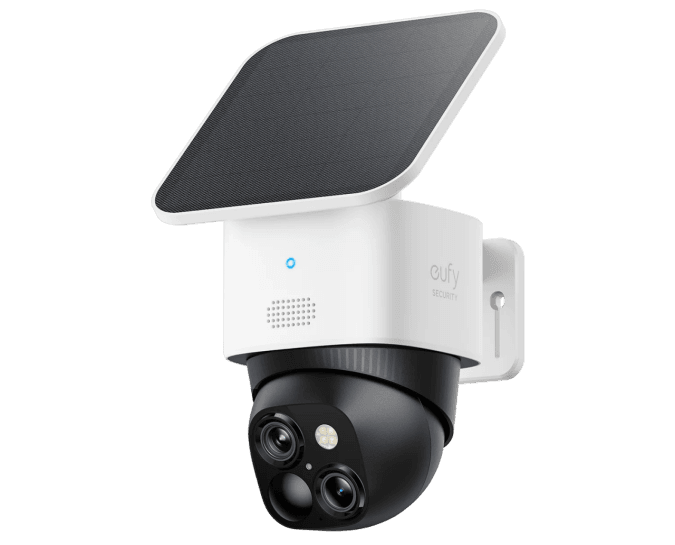
For example, the eufy SoloCam S340 may be relevant for a household looking at flexible outdoor coverage in an area such as a driveway or front yard. But the product choice should come after the placement plan, not before it. No camera, from any brand, can fully compensate for a bad angle, poor lighting, weak signal, or intrusive view into a neighbour’s space.
Do Not Replace a Camera Before Testing the Basics
Unnecessary electronics purchases add up. The Global E-waste Monitor 2024 estimates that the world generated about 62 million tonnes of e-waste in 2022. Security cameras are only one small part of that larger problem, but the principle still matters: extend the life of working electronics where reasonable, and avoid replacing devices just because a setup issue has been mistaken for a hardware failure.
That same standard applies to many forms of safer tech without greenwash. A device may be genuinely useful, but usefulness does not erase its material footprint. The best case for buying new hardware is when it solves a real problem, will be used properly, and is likely to last.
Before upgrading, run through this basic troubleshooting list:
- Clean the lens, especially after rain, dust, insects, pollen, or sea air.
- Test the camera view at night, not only during the day.
- Adjust the angle to reduce direct glare and reflective surfaces.
- Check whether porch lights, streetlights, or headlights are backlighting the subject.
- Review detection zones so trees, pets, cars, and public footpaths are not triggering constant alerts.
- Check Wi-Fi strength at the mounting location.
- Confirm storage settings and recording length.
- Update firmware and review privacy settings.
If the camera still cannot do the job after those checks, replacing it may be sensible. If the problem disappears after a small adjustment, the better choice was not another device. It was better placement.
Recycle Old Electronics Properly
If a camera genuinely needs to be replaced, do not put the old device in general rubbish. Cameras, batteries, cables, chargers, and related electronics can contain materials that should be recovered or handled carefully.
The U.S. Environmental Protection Agency notes that reusing electronics extends product life spans and reduces demand for raw materials. In Australia, the National Television and Computer Recycling Scheme gives households and small businesses access to industry-funded collection and recycling services for eligible electronics such as televisions, computers, printers, computer parts, and peripherals.
Small camera devices may not always fit neatly into every national scheme category, so check local council e-waste programs, retailer take-back options, battery recycling points, and manufacturer guidance. The goal is simple: keep useful materials in circulation and hazardous components out of landfill wherever possible. For a broader look at this problem, see our guide to end-of-life planning for clean technology.
Responsible Outdoor Camera Placement Checklist
- Identify the exact event or access point the camera needs to capture.
- Prioritise doors, driveways, gates, garages, and main approach paths.
- Use height and angle to capture faces, not just movement.
- Test the view at night before final mounting.
- Avoid aiming directly into lights, streets, or reflective surfaces.
- Use motion sensors, timers, and daylight controls for outdoor lighting where appropriate.
- Keep cameras focused on your property.
- Use privacy zones to block neighbouring windows, yards, or private areas.
- Check Wi-Fi signal, storage, battery, and power before relying on the system.
- Maintain the camera before replacing it.
- Recycle or responsibly dispose of old electronics if an upgrade is genuinely needed.
Conclusion
Responsible outdoor security camera placement is a balance between safety, usefulness, privacy, and restraint. The aim is not to record as much as possible. It is to record what matters, clearly enough to be useful, without creating avoidable privacy problems or wasting energy and electronics.
Start with the access points. Place cameras for faces, not just movement. Use lighting carefully. Avoid filming private spaces that are not yours to monitor. Test the view at night before buying more gear.
A well-placed camera can do more than an extra camera installed in the wrong spot. And in many homes, the most responsible upgrade is not another device at all. It is a better decision about where the existing one should point.